The Benefits of Virtual Exhibition Planning
Virtual exhibition planning simplifies collaboration, design and installation. Discover the key benefits for museums and galleries.
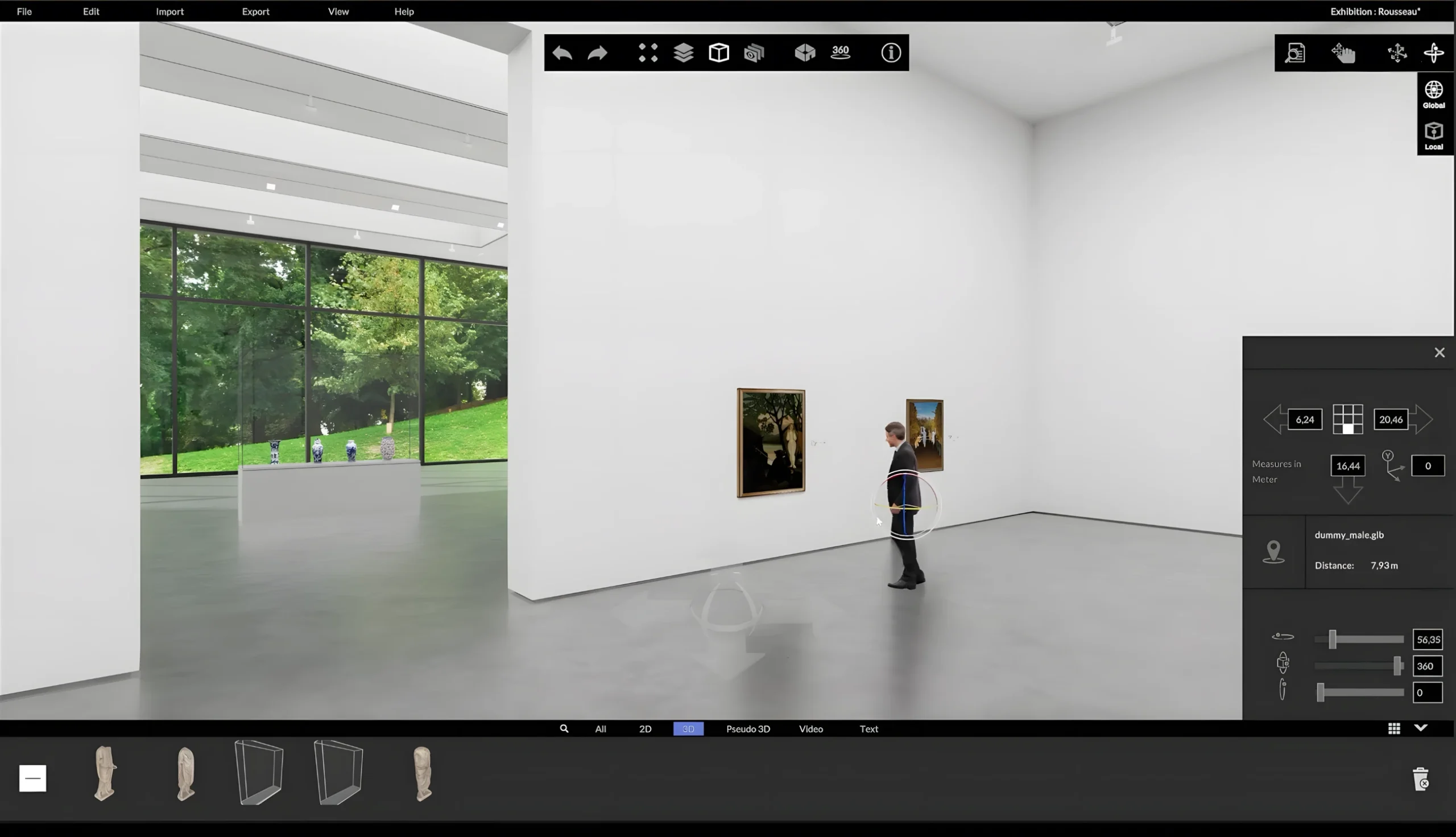
A successful exhibition begins long before the opening. Works are selected, spaces are organised, sightlines are assessed and logistical processes are prepared. At the same time, curatorial, design, conservation and technical requirements must be brought into alignment. Many people are often involved in this process: curators, conservators, registrars, scenographers, architects, exhibition technicians, lenders and art handlers. They all need reliable information and a shared understanding of what the finished exhibition should look like. Virtual exhibition planning brings these requirements together in a scale digital model of the space. With cura3D, museums, galleries and cultural institutions can plan, visualise and develop their exhibitions collaboratively before the first object is moved.
What is virtual exhibition planning?
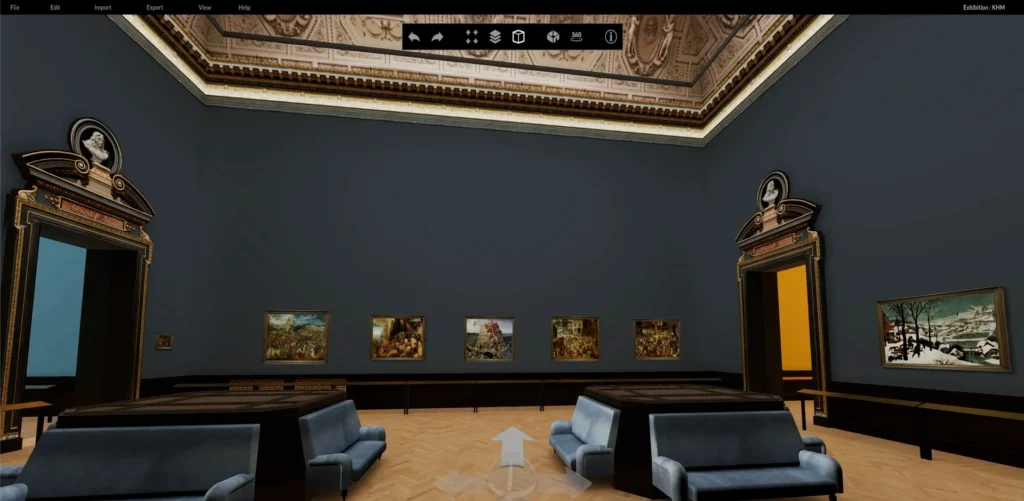
Virtual exhibition planning recreates a real exhibition space as an accurate, scale 3D model. Paintings, sculptures, display cases, plinths, partition walls, screens and other exhibition elements can be positioned within this digital twin. Unlike a conventional floor plan, a navigable 3D model provides an immediate sense of the space. Proportions, distances, sightlines and the impact of the exhibits become visible. Wall colours, frames, mounts and temporary architecture can also be tested at an early stage. In this way, an initial curatorial idea becomes a robust foundation for design, coordination, logistics and installation.
1. Collaborative Working
Different departments and external partners work together on an exhibition. Without a shared visual reference, however, designs, object lists and technical drawings can quickly be interpreted in different ways. cura3D creates a shared digital model that everyone involved in the project can use as a common point of reference. Planning stages and alternatives can be presented, discussed and developed clearly. Decisions become easier to understand because the team is no longer discussing only abstract measurements or separate documents. Everyone can see the proposed spatial arrangement and contribute their specialist perspective at an early stage. This facilitates collaboration between curatorial, conservation, architecture, technical, learning and art-handling teams.
2. Location-Independent Planning
Curators, lenders, architects and other project partners are not always based in the same place. In-person meetings remain important, but they are not necessary for every planning session. A virtual exhibition can be presented and reviewed regardless of location. External stakeholders gain an early and accessible impression of the proposed layout, hanging and design. This makes coordination more flexible while reducing travel and the associated costs. It is particularly useful for international exhibition projects and collaborations with external curators.
3. A Shared Visual Model Improves Communication
Descriptions such as “a little further to the left” or “more space to the next work” leave considerable room for interpretation. Technical drawings are not equally easy for everyone to understand either. A navigable 3D model makes the plan tangible. Everyone involved sees the same spatial arrangement and can compare alternatives directly. The virtual model becomes a shared visual language. Misunderstandings can be identified earlier and open questions addressed more precisely. It also becomes easier to communicate design decisions to directors, lenders, funders and external service providers.
4. Fewer Object Movements
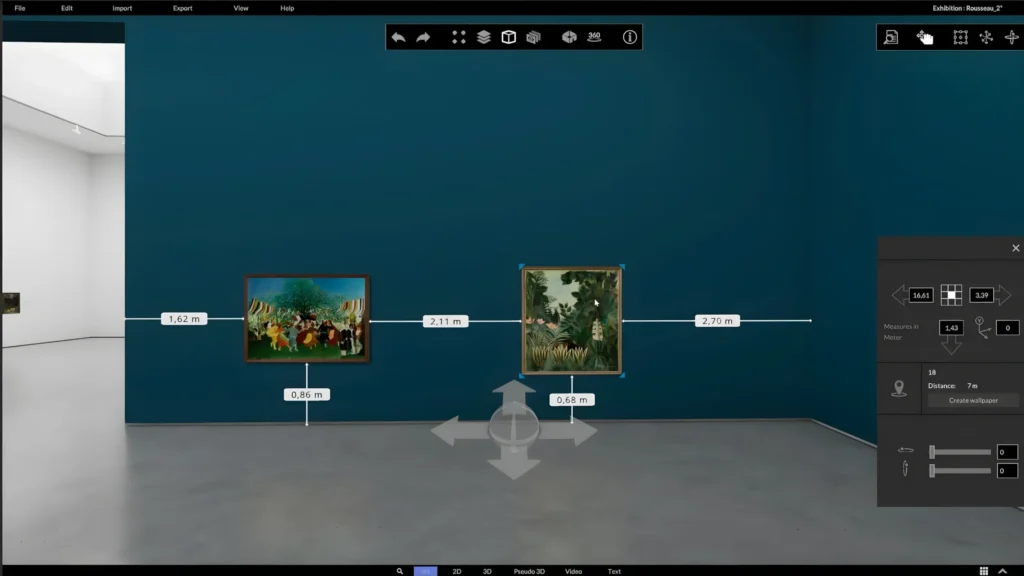
Some decisions are traditionally made only after the exhibits have already arrived in the gallery. Every additional movement takes time and may pose a risk to the object. With cura3D, positions, proportions and distances can be checked in the digital space in advance. Different hanging arrangements can be tested without repeatedly unpacking, transporting or temporarily positioning original works. Virtual planning does not replace a conservation assessment, but it can help avoid unnecessary object movements and manual handling. This is particularly important for sensitive, heavy or valuable objects.
5. Extensive Simulation Options
A digital twin makes it possible to test different design ideas at an early stage of the project:
- What effect would a coloured wall have?
- Does the exhibition need additional partition walls?
- How do plinths and display cases affect the space?
- Are the distances between exhibits well balanced?
- Do the proposed sightlines work?
- Is there enough circulation space?
- How does a sculpture appear from different perspectives?
- Which hanging arrangement supports the exhibition narrative?
- How does temporary architecture alter the visitor route?
Alternatives can be saved, presented and evaluated together. Decisions therefore do not have to rely solely on abstract plans or wait until the installation stage.
6. Precise Plans for Exhibition Installation
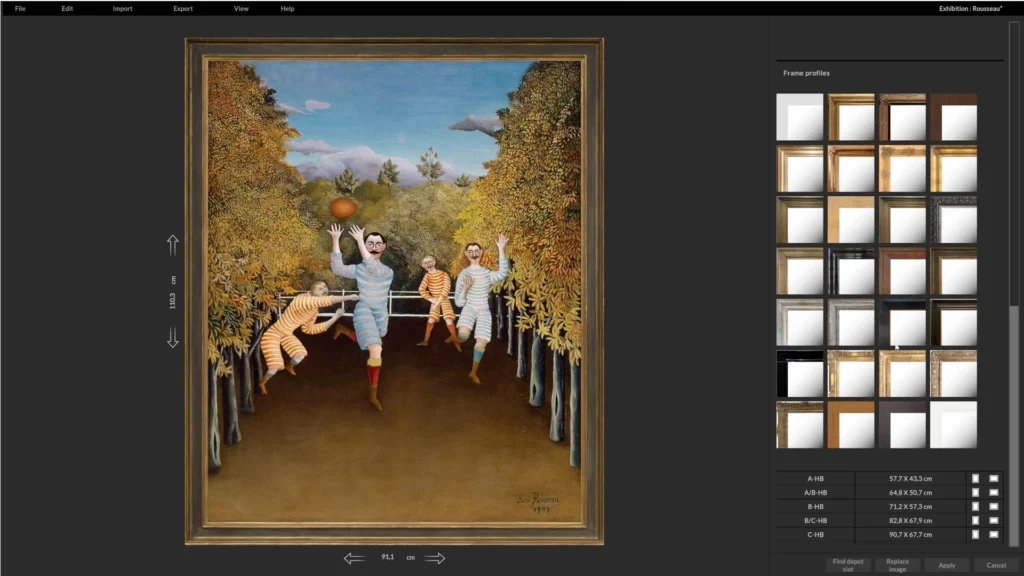
Attractive visualisations alone are not enough to deliver an exhibition. Exhibition technicians and art handlers need clear positions, reliable measurements and easy-to-understand documentation. Planning with cura3D can produce documents and data such as:
- floor plans,
- wall elevations,
- object lists,
- views of the exhibition spaces,
- details of positions and clearances,
- information about frames and mounts,
- representations of temporary architecture,
- visualisations for internal and external coordination.
Virtual exhibition planning therefore becomes a practical working basis for installation. Last-minute changes on site can be reduced and workflows prepared more effectively.
7. Optimising Logistical Workflows
An exhibition must not only be visually compelling; it must also be practical to install. Transport routes, object dimensions, installation sequences, safety clearances and available working space all play an important role. Potential conflicts can be identified early in the virtual space. The planning team can check, for example, whether large-format objects can reach their intended position, where additional partition walls are needed and which installation sequence is most efficient. The position of display cases, plinths and temporary architectural elements can also be coordinated with the movement and working areas required by art handlers. Early planning makes logistical processes more predictable and reduces the risk of costly changes during installation.
8. More Flexible than Many Physical Models
Physical architectural models can make a valuable contribution to exhibition planning, but producing and adapting them is comparatively time-consuming. If the hanging or layout changes, parts of a physical model often need to be remade. In a digital model, alternatives can be created, duplicated and discarded more quickly. Wall colours, exhibits and temporary architecture can be adjusted without producing new model components. Digital and physical models are not mutually exclusive. Virtual exhibition planning offers clear advantages, however, when a project involves many alternatives, spaces, locations or stakeholders.
9. Reuse Existing Collection Data Directly
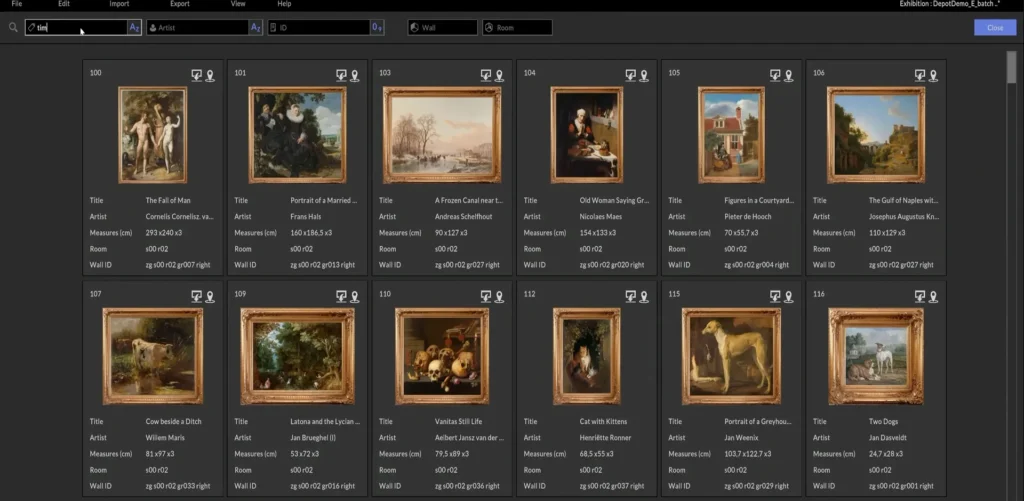
In most museums and galleries, object information is already held digitally. Titles, inventory numbers, dimensions, images, artists and other metadata are stored in a collection database or collection management system. Yet for exhibition planning, this information is often transferred manually into spreadsheets, presentations or separate object lists. This creates additional work, possible transcription errors and inconsistent versions of the data. cura3D can connect to existing collection databases, making the information available for spatial planning. Images and dimensions can be assigned to exhibits, while inventory numbers, titles and other metadata remain accessible throughout the planning process. Integrations are available for systems including:
- zetcom MuseumPlus,
- Gallery Systems TMS,
- Axiell,
- Collective Access,
- easydb,
- fylr,
- IMDAS,
- Robotron Daphne,
- Artlogic,
- other collection management systems,
- Excel and CSV data.
The existing system remains the central source for collection data. cura3D adds visual and spatial exhibition planning to the established digital infrastructure. There is no need to migrate or replace the collection database. The information transferred can be tailored to the institution’s data structure and preferred workflow. Museums working with zetcom MuseumPlus, for example, can use their existing collection data for spatial planning with cura3D, including when researching digital exhibition planning under terms such as zetcom Curator.
10. Less Duplicate Data Maintenance
When information is transferred manually from a collection database to spreadsheets and planning documents, changes often have to be updated in several places. A direct data connection reduces this work. Dimensions, inventory numbers, titles, images and other metadata do not need to be compiled again for every exhibition. This lowers the risk of planning with outdated or incomplete information. It also makes it easier to distinguish information originating in the collection management system from details added during spatial planning.
11. Reusable Planning Data
A digital model of a space is created once but can then be used for many projects. The planning data does not automatically lose its value when an exhibition ends. It can be reused for tasks including:
- planning future temporary and permanent exhibitions,
- documenting completed exhibitions,
- preparing guided tours and learning programmes,
- coordinating with lenders,
- press and communications work,
- virtual tours,
- digitally reconstructing historical displays,
- archiving design decisions.
Over several projects, this can develop into a digital planning archive. Previous spatial concepts, hanging arrangements and decision-making processes remain traceable even when members of staff change.
12. Support for Funding Applications and Sponsorship
Funding applications and sponsorship discussions often take place before an exhibition can be realised. At this stage, only texts, object lists and initial plans may exist. Visualisations from the 3D model can communicate the proposed project clearly. Sequences of spaces, design ideas and the impact of key exhibits become understandable even to people who do not read technical floor plans. Virtual planning does not replace a well-founded project description or budget, but it adds an accessible visual dimension and can help communicate the intended result more convincingly.
13. More Sustainable Planning Processes
Less travel, fewer trial installations and better preparation of logistical workflows can conserve resources. Early spatial checks can also help avoid incorrect orders or last-minute alterations. Virtual exhibition planning is not automatically sustainable, but it creates better conditions for planning material use, transport and travel more consciously. Once created, spatial models can also be used for many years and across different projects.
14. Greater Confidence in Decisions
A key benefit of virtual exhibition planning is the ability to review decisions at an early stage. Spatial conflicts and open questions become visible before they create time pressure and additional costs during installation. At the same time, the curatorial process remains open. Alternatives can be developed, compared and discarded. This gives exhibition teams more creative freedom while increasing planning certainty. The software does not make curatorial decisions. It creates a space in which those decisions can be made earlier, together and on a stronger basis.
Virtual Planning Does Not Replace the Original
However powerful a digital 3D model may be, the effect of an original work of art cannot be fully reproduced on screen. Materiality, surfaces, details and immediate spatial experience remain essential aspects of an exhibition. Virtual exhibition planning is not intended to replace that experience. Its greatest value lies in preparation: it helps teams make spatial and organisational decisions before those decisions involve effort, cost or risk. The result is not a purely digital exhibition, but a better-prepared physical one.
Conclusion: From the Initial Idea to a Precise Exhibition Plan
Virtual exhibition planning combines curatorial design with precise spatial data. It facilitates collaboration, improves communication and provides a reliable basis for logistics and installation. With cura3D, exhibitions can be developed, presented and documented in an accurate digital model of the space. Existing collection data can be integrated without requiring museums or galleries to replace their established database. This creates a continuous workflow from the first curatorial idea and collaborative spatial planning through to the final exhibition and hanging plan—with less coordination, greater certainty and more scope for curatorial and design decisions.
Questions?
We’ll be happy to advise you!
Frequently Asked Questions
What is virtual exhibition planning?
Virtual exhibition planning recreates real exhibition spaces as accurate, scale 3D models. Exhibits, display cases, plinths, partition walls and other elements can be positioned in these models, allowing different design concepts to be tested.
Which collection databases can cura3D connect to?
cura3D can connect to systems including zetcom MuseumPlus, Gallery Systems TMS, Axiell, Collective Access, easydb, fylr, IMDAS, Robotron Daphne and Artlogic. Other collection management systems, as well as Excel and CSV data, can also be integrated.
Does the existing collection database need to be replaced?
No. cura3D adds virtual exhibition planning to the existing system. The established database remains the central source for object information and metadata.
Which data can be imported?
Depending on the system and configuration, inventory numbers, titles, artists, dimensions, images, object descriptions and other planning-related metadata can be made available.
Can cura3D create hanging plans?
Virtual planning can produce accurate wall elevations, floor plans, views and object lists for preparing the exhibition installation.
Does virtual exhibition planning replace a physical model?
Not necessarily. Physical and digital models can complement one another. A virtual model is particularly useful when many alternatives, spaces or project stakeholders need to be considered.
Is cura3D only suitable for museums?
No. cura3D is also suitable for galleries, collections, exhibition venues, art associations and other institutions that want to plan and present spaces and exhibits professionally.
What are the benefits of digital exhibition planning?
Key benefits include better collaboration, location-independent coordination, fewer object movements, early simulations, precise hanging plans and better-prepared logistical workflows.